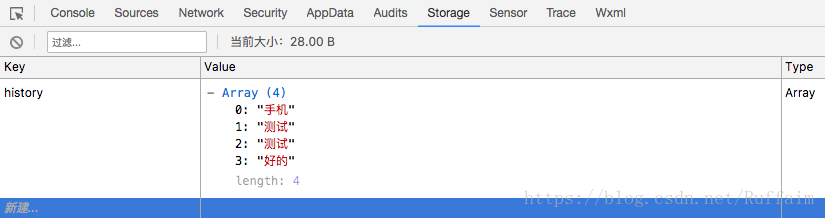
代码实现集合wx.setStorageSync()和wx.getStorageSync()这两个同步函数来实现这个功能实际上非常简单。
!--wxml--viewclass="search-box"viewclass='icon'imagesrc='../../assets/search.png'mode='widthFix'/image!--使用bindinput属性绑定getSearchKey函数获取input组件中的值--!--使用bindblur属性绑定routeToSearchResPage函数处理input失去焦点事件--inputplaceholder='搜索你想购买的商品'bindinput='getSearchKey'bindblur='routeToSearchResPage'/input/viewtext取消/text/viewviewclass='options'text历史搜索记录/texttextbindtap='clearHistory'清空/text/viewviewclass='options'!--遍历history数组--textclass='item'wx:for='{{history}}'data-index='{{index}}'bindtap='routeToSearchResPage'{{item}}/text/view样式表可无视
/wxss/.search-box{background-color:#142341;overflow:hidden;padding:3%;}.search-box.icon{width:80%;padding-left:2%;background-color:#fff;float:left;border-radius:1rem;}.search-box.iconimage{width:1rem;height:1rem;display:block;margin:0.5rem0;float:left;}.search-boxinput{display:block;font-size:0.8rem;height:2rem;line-height:2rem;float:left;margin-left:5%;}.search-boxtext{width:18%;float:left;color:#fff;line-height:2rem;text-align:center;font-size:0.8rem;}.options{width:94%;margin:3%;font-size:0.8rem;color:#999;}.optionstext:last-child{color:#1268bb;float:right;}.options.item{padding:0.2rem0.5rem;background-color:#eee;float:left!important;color:#565656!important;border-radius:0.1rem;margin:3%;}JavaScript
//index.jsPage({data:{searchKey:"",history:[]},//获取input文本getSearchKey:function(e){this.setData({searchKey:e.detail.value})},//清空page对象data的history数组重置缓存为[]clearHistory:function(){this.setData({history:[]})wx.setStorageSync("history",[])},//input失去焦点函数routeToSearchResPage:function(e){//对历史记录的点击事件已忽略let_this=this;let_searchKey=this.data.searchKey;if(!this.data.searchKey){return}lethistory=wx.getStorageSync("history")||[];history.push(this.data.searchKey)wx.setStorageSync("history",history);},//每次显示钩子函数都去读一次本地storageonShow:function(){this.setData({history:wx.getStorageSync("history")||[]})}})本地存储可在微信开发者工具调试的Storage可见。